RNNavigationView: turn-by-turn navigation UI in React Native
<RNNavigationView> is a turn-by-turn navigation UI written in React Native on top of the headless API, on an @rnmapbox/maps navigation map. It looks the same on iOS and Android. Use it as is, or copy its source as a starting point for your own UI.
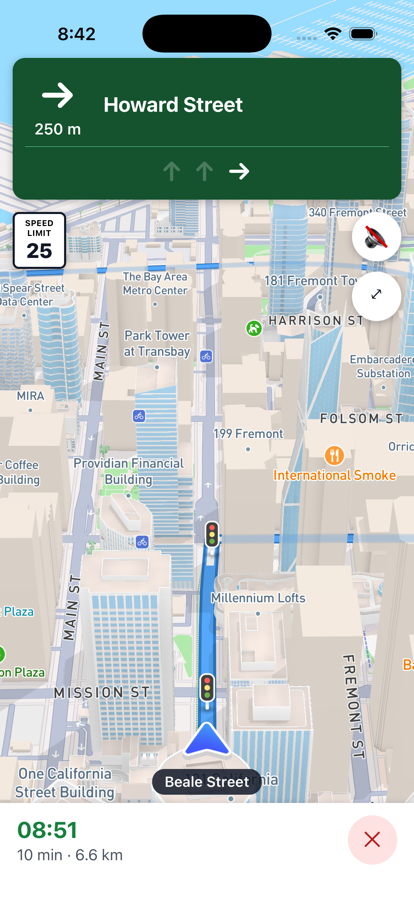
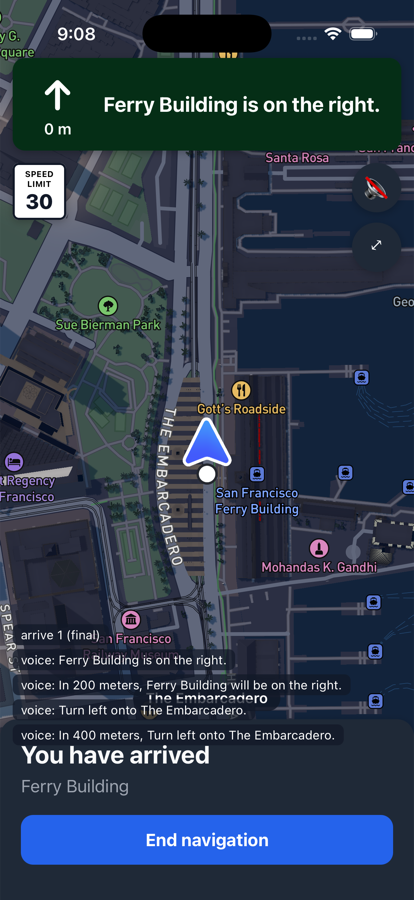
It shows:
- a maneuver banner with the next instruction, the distance to it, road shields, exit numbers and the lanes;
- the speed limit sign (US or Vienna style) and the current road name;
- arrival time, remaining time and distance;
- mute, overview/recenter and end buttons;
- an arrival card with the destination name and an end button.
With waypoints it also requests alternative routes. Navigation maps draw them, and tapping one switches guidance to it, which addRouteChangeListener reports with reason: 'alternative'.
import { RNNavigationView } from '@rnmapbox/navigation';

<RNNavigationView
  style={{ flex: 1 }}
  waypoints={[
    [-122.39726, 37.79205],
    { coordinate: [-122.39351, 37.79554], name: 'Ferry Building' },
  ]}
  simulate
  onArrive={({ isFinalDestination }) => {}}
  onCancel={() => close()}
  onError={({ code, message }) => {}}
/>
Props
It takes the same props as <NavigationView> (route or waypoints, simulate, mute, onRouteProgress, onArrive, onCancel, onError, style, testID), plus:
| Prop | Type | Description |
|---|---|---|
distanceUnit | 'metric' | 'imperial' | Unit of the distances it shows, and of the voice instructions of a route it requests through waypoints. Defaults to Navigation.getDefaultDistanceUnit(), from the device's region and measurement settings. |
appearance | 'auto' | 'day' | 'night' | Colors of the UI and the Standard style's light preset. 'auto' (default) is night while the system is in dark mode. |
styleURL | string | Map style. Defaults to Mapbox Standard. With another style, appearance only changes the UI. |
nightStyleURL | string | Map style while appearance is night. Defaults to styleURL. |
routeLineStyle | RouteLineStyle | Route line colors, see Styling. |
children | ReactNode | Rendered inside its MapView, e.g. extra sources and layers. |
See RNNavigationViewProps in the API reference.
Session
Like <NavigationView>, it uses the app's single navigation session: mounting it, or giving it a new route, starts guidance along that route and replaces any other active guidance; unmounting it or tapping the end button stops guidance. Show one at a time.
It reads the headless events (route progress, location, camera state, off-route, arrival), so your own Navigation.add…Listener subscriptions keep working alongside it.
Road shields come from the Directions API's shield images, not the Mapbox designed shields the native banners use.